
CCTV is a private video network that sends images from one or more cameras to authorized monitors, recorders, or mobile devices. A modern setup may use analog equipment, IP cameras, local recording, or cloud storage. Homes and businesses use it to observe entrances, work areas, parking lots, and other selected spaces. In Massachusetts, outdoor equipment must also withstand snow, moisture, and changing temperatures.
What Is CCTV and How Does It Work?
What is CCTV, and how is it different from an ordinary camera pointed at a front door or store entrance? CCTV is a private video setup built to observe selected areas and deliver footage only to authorized viewers. Depending on the design, the video may appear on a monitor, be saved to a recorder, or be opened through a secure computer or mobile application.
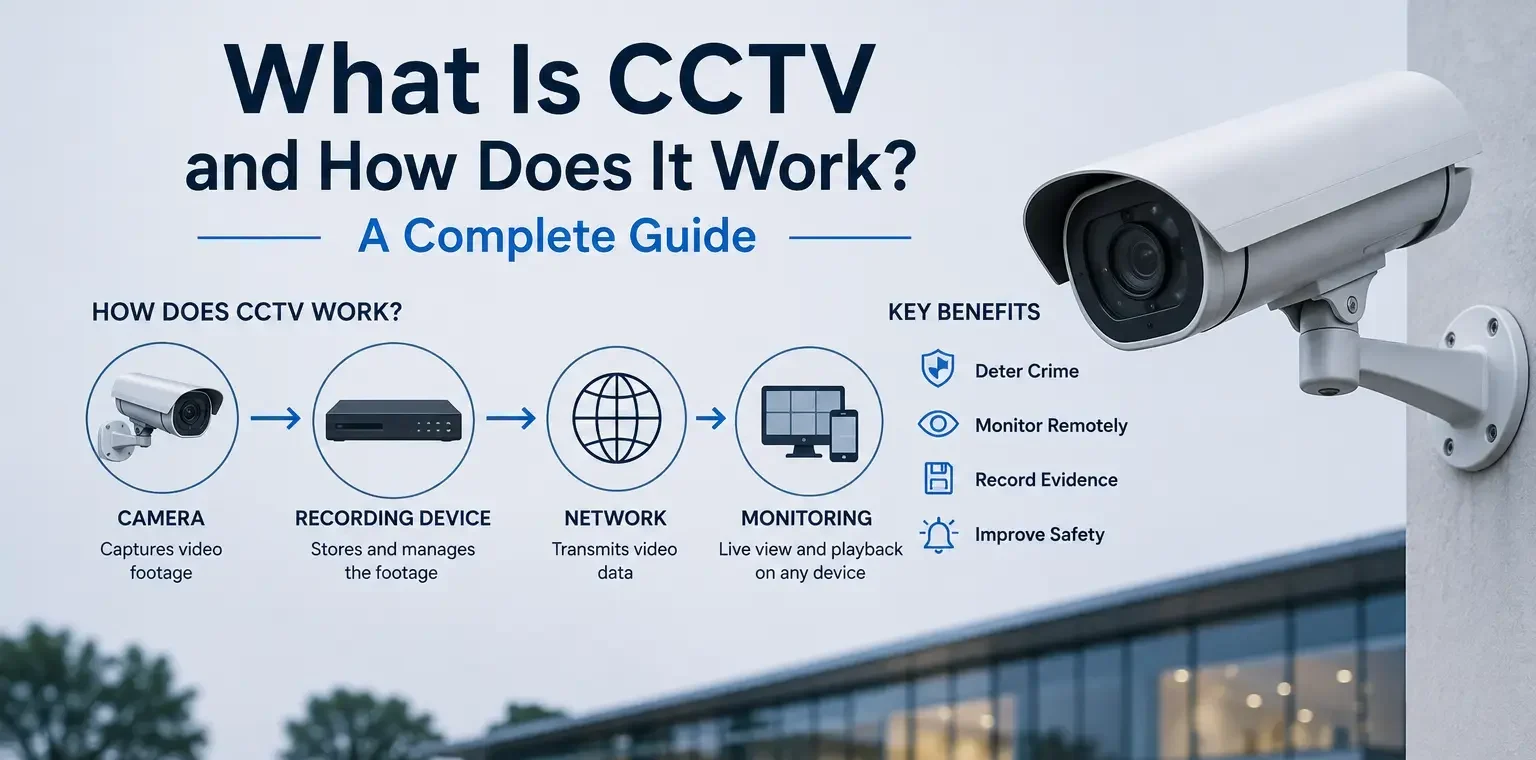
The basic idea has remained consistent even as the equipment has changed. Cameras capture activity. A wired or network connection carries the image. Recording equipment saves it for a chosen period. Authorized users can then watch live video or return to an earlier event.
Yet two installations that look similar from the outside may work very differently behind the scenes. One may use older analog cameras and a recorder in a utility room. Another may use IP cameras, network switches, mobile access, and off-site storage. Understanding those differences makes it easier to plan a useful security camera system rather than simply buying cameras one at a time.
This article answers what is CCTV, how does CCTV work, which components are involved, and where the technology is commonly used.
What Does CCTV Stand For?
CCTV stands for closed circuit television. “Closed circuit” means the video is delivered within a restricted arrangement instead of being transmitted for the general public to watch.
Traditional television sends the same program to a broad audience. Closed circuit television sends camera images to selected monitors or recording equipment. In a modern installation, those authorized destinations can also include a computer, a secure web interface, or a smartphone application.
The word “television” can sound dated because current equipment is digital and network-based in many properties. The term remains widely used, however, and now covers both traditional analog installations and newer IP-based surveillance systems.
CCTV vs. Security Cameras — Is There a Difference?
A security camera is an individual device. It captures an image of the area within its field of view. CCTV describes the wider arrangement that allows one or more cameras to transmit, display, record, store, and retrieve that image.
For example, a homeowner may install one battery-powered camera and view alerts through an app. That device is certainly being used for security, but it may not have a dedicated recorder, fixed monitor, or structured camera network.
A CCTV system normally refers to a more organized setup. It may include several security cameras, cabling or network links, recording hardware, storage, user accounts, and software for reviewing footage.
The distinction is not absolute. People commonly use “CCTV,” “video surveillance,” and “security camera system” to describe overlapping technologies. The useful question is not which label appears on the box. It is whether the complete setup provides the coverage, recording, image detail, retention period, and access method the property requires.
A Brief History of Closed-Circuit Television
Early installations sent live images through dedicated cables to a limited viewing location. They were mainly used where people needed to observe a process or area from a distance. Recording was not always part of the design.
Later systems connected analog cameras to videotape recorders. Long tapes, limited image quality, and manual searching made footage review time-consuming. Digital video recorders eventually replaced tape and allowed images to be saved to hard drives.
Network technology changed the architecture again. IP cameras could process video digitally and send it through an Ethernet network. Network recorders, software-based management, remote access, and cloud services gave users more choices about where footage was kept and how it could be viewed.
Current surveillance systems still perform the familiar task of showing what happened in front of a camera. The difference is that recording, searching, notifications, user permissions, and remote access have become far more manageable.
How Does a CCTV System Work?
How does CCTV work in a typical building? Each camera converts light from the scene into a video image. That image travels through a physical cable or data network to recording or viewing equipment. The system saves video according to its settings and makes it available to approved users.
Some cameras record continuously. Others record when movement is detected, during scheduled hours, or after a particular event. The correct method depends on the area, available storage, and reason for recording.
A front entrance may require constant coverage during business hours. A quiet storage room may only need event-based recording. A parking lot may require a combination of continuous video and motion alerts.
The Main Components of a CCTV System
A complete CCTV system usually contains more than cameras. Its principal parts include:
- Cameras: These create the video image. The appropriate lens, resolution, low-light capability, housing, and viewing angle depend on the location.
- Recorder: Analog equipment generally sends footage to a digital video recorder. Network equipment commonly uses a network video recorder. The phrase DVR NVR refers to these two main recorder categories.
- Transmission path: Coaxial cable, Ethernet cable, Wi-Fi, fiber, or another network link carries video and control data.
- Power: A separate power supply, local adapter, battery, or Power over Ethernet connection operates the camera.
- Storage: Internal hard drives, network storage, memory cards, or a cloud service retain footage.
- Monitor or viewing device: Live and recorded images may be opened on a dedicated screen, desktop computer, tablet, or phone.
- Management software: Software allows users to select cameras, search recordings, export clips, adjust settings, and manage permissions.
- Network equipment: IP installations may require switches, routers, secure internet access, and correctly planned bandwidth.
These parts have to be compatible. A camera can produce excellent video while still delivering poor results if the recorder cannot handle its resolution, the cable is damaged, the network is overloaded, or storage capacity is too small.
How Footage Is Recorded and Stored
Analog cameras send a video signal to a DVR, which converts and saves the footage digitally. IP cameras create digital video within the camera and send it across the network, commonly to an NVR or server.
Retention is the amount of time the recordings remain available. It is influenced by:
- Number of cameras
- Image resolution
- Frame rate
- Recording schedule
- Compression method
- Motion levels
- Hard-drive capacity
- Legal or organizational requirements
Higher resolution and longer recording periods require more storage. Continuous recording also consumes more space than event-based recording.
Local storage keeps the primary recordings at the property. It can provide direct control and does not require every video stream to be uploaded through the internet. The recorder should nevertheless be placed where casual visitors cannot unplug, damage, or remove it.
Cloud storage CCTV arrangements send recordings or selected events to off-site infrastructure. This can make video available even if the on-site recorder is damaged or stolen. It may also simplify access across several locations. The tradeoffs include recurring fees, internet dependence, upload capacity, provider policies, and cybersecurity requirements.
Some properties use both methods. Recent footage may remain on a local recorder, while important events or selected cameras are also stored elsewhere.
Accessing CCTV Footage Remotely
Remote access allows an approved user to open live or recorded video without standing beside the recorder. This may be done through a desktop program, browser, tablet, or mobile application.
Remote viewing security cameras can be useful for checking a delivery entrance, confirming whether a store has closed, reviewing an alert, or observing several properties from one account.
Convenience should not replace security. Networked equipment needs strong passwords, controlled user permissions, software updates, and a properly configured connection. Shared administrator accounts make it difficult to know who changed settings or exported video.
Each person should receive only the access required for their role. A store manager may need all retail cameras, while a tenant or department supervisor may only need one entrance.
Types of CCTV Systems
The best architecture depends on the building, existing infrastructure, viewing conditions, and expected use. The most common comparisons are analog versus network technology, wired versus wireless transmission, and indoor versus outdoor equipment.
Analog vs. IP CCTV Cameras
When comparing analog vs IP cameras, the largest difference is where the video becomes digital and how it reaches the recorder.
An analog camera sends its signal through coaxial cable to a DVR. This architecture can be practical when a building already has usable coaxial wiring. It may allow an older installation to be upgraded without replacing every cable route.
IP cameras process the image digitally and communicate over a network. They commonly connect through Ethernet cabling and may receive power through the same cable. The video then travels to an NVR, server, or another approved storage destination.
IP cameras often provide greater flexibility for high-resolution video, remote configuration, system expansion, and integration with other networked equipment. They also place demands on switches, bandwidth, addressing, user access, and cybersecurity.
Analog equipment is not automatically obsolete, and network technology is not automatically appropriate for every site. A technician should consider the condition of existing cable, number of devices, required image detail, budget, and future expansion.
Wired vs. Wireless Surveillance Systems
The phrase wired vs wireless security cameras usually describes how video data travels, but power must be considered separately.
Wired cameras send data through a physical cable. Analog devices typically use coaxial cable, while network devices commonly use Ethernet. A wired connection offers consistent communication and is generally preferred where continuous operation is important.
Wireless equipment sends video through Wi-Fi, cellular service, or another radio link. It can reduce the need to install data cable through finished walls or across difficult spaces.
A wireless camera may still require a power cable. Battery-operated units avoid that connection but need charging or battery replacement. Their recording behavior may also be designed around conserving power rather than capturing every second.
Wireless surveillance systems can work well in smaller properties with dependable coverage. They become less predictable where thick walls, metal surfaces, long distances, interference, or crowded networks weaken the signal.
Before selecting wireless equipment, coverage should be tested at the actual mounting position. A strong signal beside the router does not prove that the camera will remain connected at an exterior corner, detached garage, or far end of a parking area.
Indoor vs. Outdoor CCTV Cameras
Indoor security cameras operate in relatively controlled conditions. They may be used in lobbies, hallways, stockrooms, sales floors, offices, or residential common areas.
Because indoor security cameras are protected from direct rain and snow, their housings may be lighter. Placement still matters. Windows, bright entrances, reflective surfaces, shelves, hanging signs, and changing room layouts can obstruct the image.
Outdoor security cameras require housings designed for moisture, dust, temperature changes, and physical exposure. Some locations may also call for impact resistance, sunshields, heaters, or special mounting hardware.
Outdoor security cameras should not simply be aimed at the largest possible area. A wide view may show the entire driveway while providing too little detail to identify a person or vehicle. Camera position should follow the task: observing general movement, viewing faces at an entrance, reading vehicle details, or monitoring a specific boundary.
Indoor and exterior devices often work together. The outside camera shows someone approaching, while the inside view records what happens after the person enters.
Where Is CCTV Used? Common Applications
Surveillance cameras are installed wherever there is a reasonable need to observe activity, document events, or manage operations. The coverage plan should reflect how the property is used rather than placing identical cameras at regular intervals.
CCTV for Homes and Residential Properties
At a house, security cameras often cover the front entrance, driveway, garage, side path, backyard access, or another practical route toward the building.
The objective should be defined before installation. A camera used to recognize a visitor at the door needs a different angle from one intended to show general activity across a yard. A driveway view may need to capture vehicles entering, while a package area may require a closer image.
Homeowners should also think about notifications and recording habits. Constant motion alerts from trees, headlights, pets, or passing traffic quickly become unhelpful. Detection areas and schedules should be adjusted to the property.
In multifamily housing, common-area surveillance requires additional planning. Entrances, mail areas, garages, and shared hallways may have legitimate monitoring purposes, but cameras should not be directed into places where occupants reasonably expect privacy.
Security Camera Systems for Businesses and Retail
Retail properties use surveillance cameras to review entrances, sales areas, registers, stockrooms, loading points, and closing procedures. The coverage can help staff understand an incident, verify a transaction, or examine how an area was used.
A security camera system for a store should provide both overview and detail. One broad image of the sales floor may show movement but fail to capture useful detail near a register or doorway.
Offices often focus on reception, exterior entrances, service corridors, equipment rooms, and shared areas. Cameras should support a defined operational purpose rather than being installed simply because a corner is available.
A business security camera system must also account for working hours, user permissions, footage retention, and who may export recordings. These decisions should be documented rather than left to whichever employee has the recorder password.
Several business locations can be managed through a common platform, but each site still needs its own camera plan. A small office, warehouse, restaurant, and retail shop do not have the same lines of sight or recording priorities.
Surveillance Cameras for Parking Lots and Commercial Buildings
Parking areas are challenging because cameras must cover distance, changing light, moving vehicles, weather, and large differences between daytime and nighttime scenes.
Surveillance cameras near entrances and exits can provide a more controlled view than one device aimed across an entire lot. Additional units may cover pedestrian routes, payment equipment, loading areas, or isolated corners.
Commercial buildings may also use security cameras in lobbies, service entrances, elevator approaches, receiving areas, and selected perimeter locations. Camera placement should follow the paths used by employees, visitors, deliveries, and contractors.
Lighting deserves particular attention. Headlights, deep shadows, reflective license plates, and bright snow can affect the image. A daytime walkthrough alone may not reveal how the scene changes after dark.
For large sites, the security camera system should be divided into useful viewing groups. Operators should not have to search through dozens of unnamed feeds to find the loading dock or south parking entrance.
Pros and Cons of CCTV Systems
Video can be valuable, but it does not replace locks, access procedures, lighting, alarms, or responsible management. An honest assessment should include what the technology can and cannot do.
Benefits of Installing CCTV
A well-planned CCTV system can provide several practical benefits:
- Live awareness: Authorized users can observe selected entrances, rooms, and exterior areas.
- Recorded context: Footage can help establish the sequence of an incident rather than relying only on memory.
- Operational review: Businesses can examine deliveries, customer flow, closing routines, or loading activity.
- Remote access: Managers and property owners can check cameras without traveling to the recorder.
- Visible deterrence: Clearly placed equipment may discourage some unwanted behavior.
- Coordination with other systems: Video can help verify an alarm, door event, or visitor request.
- Coverage outside staffed hours: Recording can continue when a property is closed or unoccupied.
These benefits depend on useful images. A badly positioned camera, incorrect clock, full hard drive, or forgotten password can make footage unavailable precisely when someone needs it.
Limitations and Privacy Considerations
Cost extends beyond buying the cameras. Cabling, recorder capacity, network equipment, mounting hardware, licenses, cloud subscriptions, replacement drives, and maintenance all affect the full expense.
The equipment also requires attention. Lenses become dirty, landscaping blocks views, clocks drift, hard drives fail, passwords are forgotten, and software reaches the end of support. A system that is never checked can create false confidence.
Privacy is another consideration. Cameras should not be placed where people reasonably expect privacy. Owners and managers should consider whether audio is enabled, who can watch footage, how long recordings are kept, and how clips are shared.
Massachusetts guidance recognizes that camera placement and the nature of the monitored space can raise privacy concerns. Property owners should establish a legitimate purpose for each view and seek legal advice when workplace, residential, audio-recording, or sensitive-space questions arise.
Cybersecurity also matters for IP cameras and remote platforms. Default credentials, outdated firmware, excessive permissions, and exposed network services can turn useful devices into avoidable risks.
CCTV Installation in Massachusetts — What to Know
The regional climate, building materials, and property layout can shape equipment selection. Older masonry buildings, finished residential interiors, detached garages, large parking areas, and exposed commercial entrances may each require a different cable and mounting strategy.
Weather-Rated Cameras for New England Conditions
Exterior equipment in New England may face rain, snow, ice, coastal moisture, wind, summer heat, and frequent temperature changes. The camera housing, connectors, junction box, mounting surface, and cable entry all need to suit those conditions.
A weather rating alone does not guarantee a durable installation. Water can follow an unsealed cable into a box. Ice can collect around an unsuitable mount. Snow or condensation can block the lens. Road spray and salt can affect low-mounted parking cameras.
A sheltered location can extend equipment life, but the shelter must not block the required view. Installers also need to consider winter sunlight, reflective snow, nighttime lighting, and whether maintenance staff can reach the device safely.
Security cameras Massachusetts properties use outdoors should be chosen for their exact placement rather than described broadly as suitable for any exterior wall.
Professional CCTV Installation vs. DIY
A simple home device may be installed without major construction. A complete surveillance network is more demanding.
Professional security camera installation begins with the purpose of each camera. The installer identifies what must be seen, selects suitable positions, checks lighting, plans cable routes, calculates storage, and confirms how users will retrieve footage.
The work may also include:
- Running and protecting low-voltage cable
- Installing weather-sealed junction boxes
- Configuring network addresses
- Setting recording schedules
- Calculating retention
- Adjusting motion areas
- Creating user permissions
- Enabling secure remote access
- Labeling cameras clearly
- Testing daytime and nighttime images
- Showing the owner how to search and export footage
DIY projects often focus on whether a live picture appears. Professional security camera installation also checks whether the view contains the necessary detail, whether recording continues reliably, and whether the footage can be found later.
Understanding CCTV Is the First Step Toward a Useful System
What is CCTV in practical terms? It is a private arrangement of cameras, transmission paths, recording equipment, storage, and viewing tools. How does CCTV work? It captures selected scenes, carries the video to an approved destination, saves it according to defined settings, and allows authorized users to review it.
The equipment should follow the property’s needs. A home may require a few carefully positioned cameras and convenient mobile access. A retailer may need detailed coverage at entrances and registers. An office may prioritize reception and service areas. A parking facility may require specialized views for vehicles, pedestrians, and changing light.
KeyTechPros provides CCTV installation services for residential and commercial properties. For CCTV installation Massachusetts owners can plan with confidence, the process should begin with coverage goals, site conditions, recording needs, and a clear understanding of who will use the footage—not with a generic camera package.